Dam sections
Gravity
A gravity dam resists the water with its own weight. The section is a mass of concrete, thick at the base. A narrow canyon is not required.
Gravity, arch, embankment, and buttress.
Open interactive modelPrompt a build and the model rises in place. X-ray the plumbing, electrical, HVAC and structure, and scrub the build order. You leave with the materials, labor, permits and schedule the job needs, ready to work yourself or hand to a contractor.
No credit card. We save your email and do not send mail from this form.
try Fusion Studio — blueprint, 3D, and render conceptsFusion Studio
Prompt → generated building
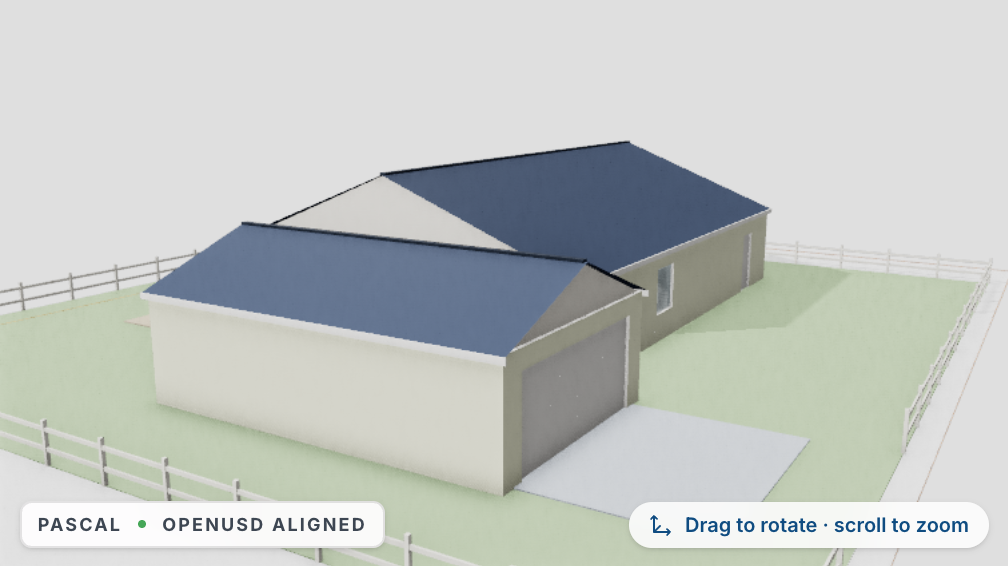
Single-storey 3-bed split-bedroom ranch with 2.5 baths, an office, a 2-car garage and an open great-room core
Address → Model
Most projects begin at an existing address. Type yours — the system locates the parcel, pulls the property facts, and synthesizes a matching floorplan and 3D model you can immediately prompt, X-ray, and re-spec. No blank canvas, no measuring tape.
Demo synthesis — the production pipeline resolves the parcel via county GIS and licensed property data, then seeds beds, baths, sqft and era from the actual listing record.
Synthesis result · floorplan
Waiting for an address…
Watch a prompt session run: each edit morphs the building and re-derives measurements, the material schedule, labor and the cost pulse in the same beat — deltas shown against the previous edit.
Step 1 proposes only the exterior and the footprint — no rooms until the client signs off on the concept.
Propose a concept: single-storey 3-bed ranch, 72 × 44 ft under roof…
Quantities re-derive from the generated geometry with stated illustrative coefficients — a core & shell ROM figure, not a bid.
Measurements
Material schedule
Cost pulse · labor
The same phase logic that replays the build above is a real CPM schedule underneath — dependencies, float and a move-in date that moves when the weather does. Click any task and every model on this page replays that phase.
Illustrative single-crew schedule for the homepage spec, derived from the same phase weights as the build-order replay.
What you leave with
Every plan ends in one package that says what the job needs. It is yours to use: do the work yourself, give it to someone else, or both.
Exports as a spreadsheet, with the model as an IFC, STEP, or STL file.
Take the materials list to the supplier and work the schedule on your own time. The permits and code sections tell you what to pull and what the inspector will look for.
Send the same package to a contractor. They price a written scope with quantities instead of a description over the phone, so the bids you get back can be compared.
Keep the parts you can do and hire out the rest. Labor is listed trade by trade, so the electrical or the plumbing can go out for a price on its own.
For contractors, trades, and handymen
The best time to meet a client is the moment they work out what the job needs. The provider network is built to put your company in front of them right then.
The plan lists the trades the job needs and how much of each. That is the point where a client stops browsing and starts looking for someone to do the work.
A finished plan shows up to three licensed companies for each trade, inside the service area that company chose, after its license, insurance, and bond are verified.
The request arrives with the plan's quantities, labor, and permits attached, so you are quoting a defined job and not a guess.
That list is on a finished plan in Plan + Takeoff. A client can request a quote from it.
Riverton Concrete & Flatwork
Lic #CO-88412 · (555) 014-2210 · rivertonflatwork.com
Estimate
#Q-2216
Sample measurements on this proposal
Scope & pricing
Proposal on your letterhead
Sample document. The prices and the measured sketch are not from a job. A real proposal uses the name, color, and markup you enter in Bid Studio.
Bid Studio puts your company name, a short logo, your color, and a markup on the proposal. You copy the text or print the page and send it yourself.
Company name, a three-letter mark, brand color, and the phone and email you type. That is the branding on the proposal.
Percent or a fixed amount, applied to the bid total on this proposal. There is no saved rate list.
Copy the proposal text or print the page. Construct PM does not email or text the client, and it does not record when they open it.
Gardens, decks, fences and pergolas get the same treatment: visualize it in your yard, size it, and walk out with a flat-pack kit — cut list, hardware bag and assembly steps you can finish in a weekend.
| Cut list | Qty | Size |
|---|---|---|
| 2×6 cedar boards | ×12 | 8 ft |
| 4×4 corner posts | ×8 | 12 in |
| Landscape fabric | ×2 | 4 × 8 ft sheet |
| Raised-bed soil | ×2 | ½ CY bag set |
| Hardware bag | 2 lb exterior screws · 8 corner brackets | |
The site plan draws the same lot and house as the hero console's model; cut lists and costs are illustrative homeowner-grade estimates.
From the learn hub
The same teaching forms as the learn hub. Flip a dam, bridge, frame, foundation, podium, retaining wall, parking structure, roof, wall, or tunnel, or switch that card to the turnable model.
Dam sections
Gravity
A gravity dam resists the water with its own weight. The section is a mass of concrete, thick at the base. A narrow canyon is not required.
Gravity, arch, embankment, and buttress.
Open interactive modelBridge forms
Beam
A beam or girder bridge bends between piers. The deck is the structure. Spans stay shorter than a suspension bridge.
Beam, arch, truss, cable-stayed, and suspension.
Open interactive modelChip fab
Wafer loop
The integrated process is one loop in the cleanroom: pattern the wafer, etch it, add a film, measure it, then go around again. Times, recipes, and tool models are not on this plan.
The wafer loop, then the designer and the foundry.
Open interactive modelThe workspace is the same. Open the job that fits: a renovation, a bid, a small crew, or federal credential prep.
Plan a renovation and leave with the materials list, permits, and schedule. Do the work yourself, or hand the licensed parts to a trade.
Estimation and scheduling in the app, plus a listing in the provider network for the moment a nearby client needs your trade.
Walk the job, build the estimate, and send a quote with your own logo on it. The schedule flags weather before it costs you a day.
Study guides for NAVFAC, USACE, and Davis-Bacon work in the learn hub.
Annual billing saves 15%.
For DIYers & hobbyists
For solo pros
For small businesses
For GCs & agencies
Start with a prompt or an address. Leave with the package the job needs, whether you swing the hammer or hire the crew.